












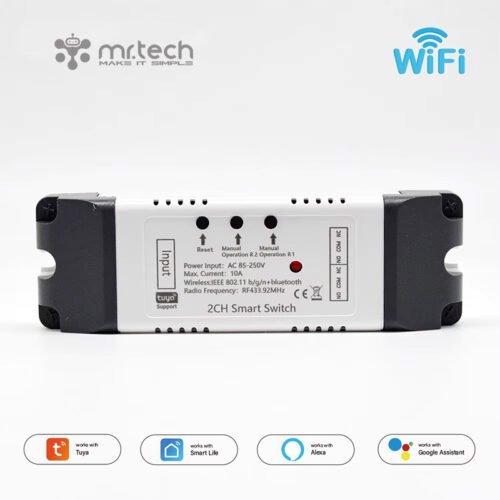
4CH WiFi Smart Switch Relay Module TUYA Smart Life App for Remote Control 


About this item
- [Working Mode] Select three modes: point, self-lock, and interlock. The click time can be set freely between 0.5 seconds and 1 hour. It can be used for garage doors, access control, smart home, and other household appliances.
- REMOTE CONTROL By remotely turning on/off different types and brands of connected devices via the eWeLink app and setting a timed schedule for your devices, you can maintain a worry-free life.
- Smart Internet: One cell phone can control multiple smart devices. You can add wifi modules and other smart devices to a group, and then you can turn on/off all smart devices at the same time.
- [Shared Control] Support to turn on/off appliances at a specific time, one device can be controlled through multiple phones and shared with others, so that you can control your smart home with your family.
- Efficient and Convenient. The device can be controlled indoors through the RF remote control. With Bluetooth RF function, it can connect and control the apps of four devices at the same time, and can independently turn on/off four devices in each gang.


Technical Details
| product type | 4CH WiFi Smart Switch Relay Module TUYA Smart Life App for Remote Control |
| App Control and Remote | |
| Brand Name | MR. TECH |
| place of origin | India |
| Model Number | MR-WF04RF85 / MR-WF04RF5 |
| Material | ABS+PC |
| button | 4 button |
| use | Universal |
| Relay Model | 1,000,00 |
| Features | Voice control APP control |
| Voltage | USB 5V AC DC 7V 12V 24V 32V / AC 85-250v |
| App | Tuya/Smart Life app |
| Voice Control | Google Assistant, Amazon Alexa |
| Wireless Protocol | WiFi 2.4GHz(NOT support 5G) |
| Max input current | 10A |
| Time Type | Timer |
| Working mode | inching /self-locking /Interlocking |
| Operating Temperature | -40 degrees to +70 degrees |
| Usage | Home Automation |
| Specification Met | CE |
| Are batteries included | No |
| function | LED Indicator Light, Timer Function, Automatic, USB Rechargeable, Light, Wireless Control, Smart, 2.4g Wireless, RF Remote Control, Wifi Control, Smart Home |
| Single package size | 7X5X2 cm |
| Single gross weight | 0.200 kg |
Note
- The relays are passive output(dry contact). No matter how much power you supply in the input, the output doesn’t have any voltage; you also need to supply power in the output.
- The power supply in the input just can only make the PCB board work. If you do not supply power in the output, the connected device can’t work.

Use for
- Remotely give a pulse signal to turn on/off Lights, Lamps, and other home appliances.
- Remotely give a pulse signal to turn on/off the Garage Door, Door Access
- Remotely give a pulse signal to control the DC Motor, AC Motor to Forward and Reverse

3 Working Modes
- Self-locking: each channel could be switched on/off separately. You can turn on/turn off all channels at the same time.
- Interlocking mode: Switch on any channel, and other channels will be switched off automatically.
- Inching mode: Switch on one channel,the channel will be automatically closed after 0.5seconds . The other channel is the same as the channel. If you need to change the mode, you need to press the mode button

How to Change the Inching Time
If you need to change the inching time. You need to press the mode button to enter self-locking mode or interlocking mode, so you can change the inching time on the APP, and the inching time is only available in the self-locking or interlocking mode) The time range is 2-3600 seconds.
Features:
- 【Two Input Ports】You could choose the USB 5V port or the screw terminal port to supply power in the input to make the PCB board work.
- 【Dry Contact/Passive Output】No matter the power you supply in the input, the output doesn’t have any voltage. If you do not supply power in the output port, the connected home appliance can’t work; you also need to supply power in the output.
- 【Timer】The connected home appliances can be automatically turned on/off according to the time schedule. Each channel can set a different time schedule. Different Ways to Control the WIFI Module
- 【APP Remote Control】You can control the connected home appliance in the Tuya or Smart Life APP for Remote Control anywhere and anytime. Such as a light, an electric kettle, an electric rice cooker, an electric curtain, etc.
- 【RF433 Control】 The WIFI Module supports RF433 Frequency, and you can control the WIFI module by RF433MHz remote controller.
- 【2.4Ghz WIFI Control】 When you are at home, you could control the module in your smartphone by 2.4Ghz WIFI
- 【Mobile Network Control】 When you go outside, you could control the device in your smart phone by 2G/3G/4G Mobile Network. (Note: The router needs to be online and the WIFI module needs to keep a close distance to the router)
- 【Voice Control 】 Compatible with Alexa and Google Assistant, you can use the voice control to turn on/off the connectted home appliances
- 【Share Control】 One device can be controlled by Multiple phones; you can share the wifi module with your family.
- 【Group Control】 one phone can control Multiple smart devices. You can add the wifi module and other smart device in a group, and then you can turn on/off all smart devices at the same time.


APP Remote Control
- You can remote turn on/off household appliances and set timing schedules to turn on/off the household appliances via the app Tuya/Smart Life anywhere, anytime.
- such as lights, electric curtains, and electric fans. So you can enjoy a high-tech life.

How do I connect my Tuya Smart Life Switch?
To connect the device in AP mode, switch the light on and, after 10 seconds, switch it off and then switch it on and off continuously
until it starts. ashing quickly (about 3 times a second). Continue switching it on and off until it starts to. Ash slowly
(about once every 3 seconds)





Reviews
Clear filtersThere are no reviews yet.